
Custody evidence app for iPhone
Evidence, organized and in context
Photos, logged times, and an edit history on the device where you make changes. Oya Shield keeps custody evidence organized, credible, and easy to hand to your attorney the day it matters.
What makes a record credible
Every entry is timestamped
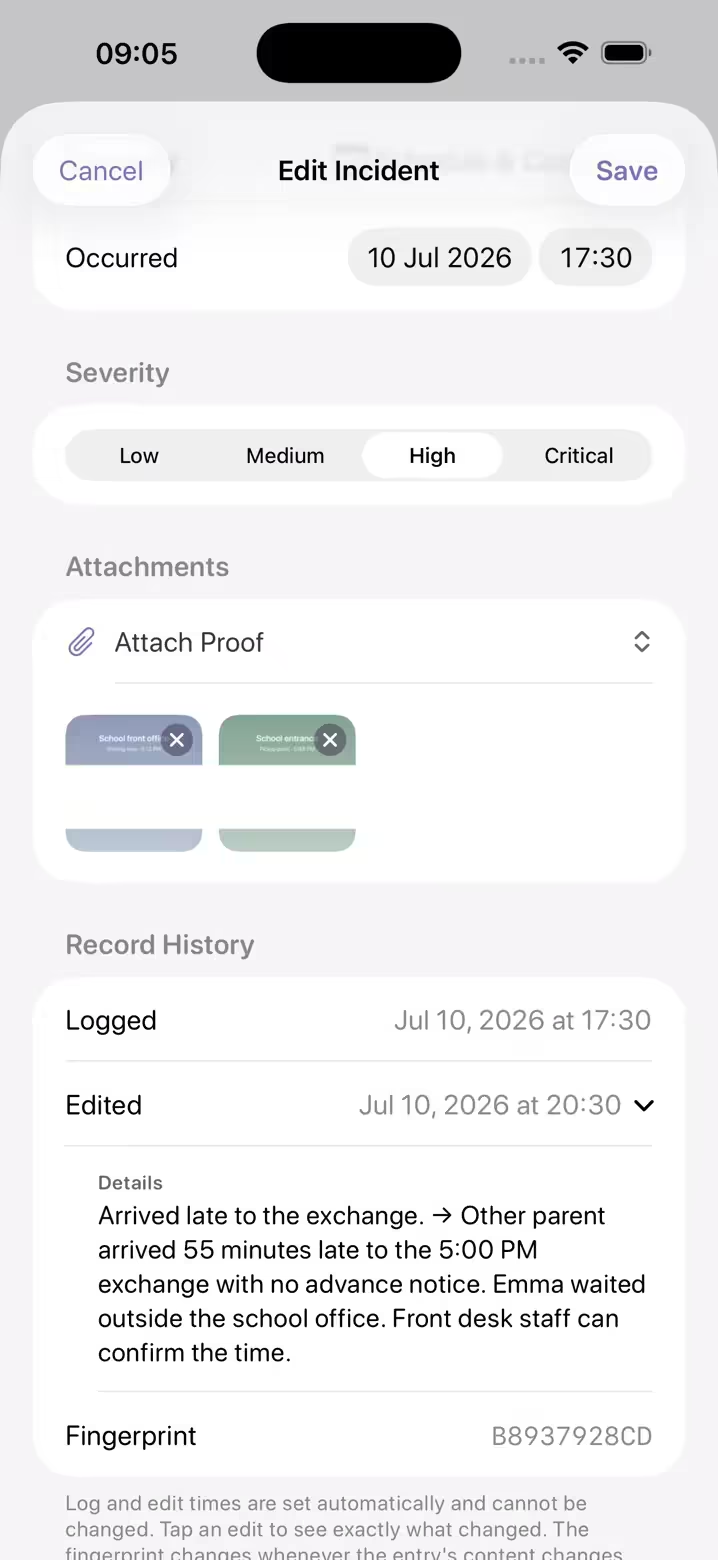
Incidents carry the date and time they occurred plus the moment they were logged, captured automatically. Contemporaneous records are the ones that get taken seriously.
Photos live with the incident
Attach photos and screenshots directly to the entry they support. Each photo keeps the capture time its camera recorded, with location details stripped out. Evidence in context beats a camera roll full of loose images nobody can place.
Edits preserve the original
Correct an entry and the original stays in the edit history on the device where you made the change, showing what changed and when, and PDF reports made on that device print it. Edit histories do not sync to your other devices or appear in a professional’s view.
A fingerprint on every entry
Each entry carries a fingerprint of its content, creation time and edit history. It changes if any of them change, so two exports can be compared to see whether an entry changed between them.
A clean PDF report in minutes
With Premium, make a clean, chronological, dated PDF report for your attorney or mediator, with amendments noted, or give them a read-only view in their browser that you can end at any time. Exporting your full record as a ZIP file stays free.
Private to you
Encrypted and tied to your account only. There is no co-parent view, and nothing is shared unless you share it. Sign in with one-time email codes; there’s no password to leak.
Import & Bulk Add
The screenshots you already have
If you have been collecting evidence in your camera roll, it does not have to stay a scroll of loose images. Import Screenshots takes up to 8 pictures of one conversation from your photo library and proposes incident drafts: a title, a summary, a category and a severity, plus up to three quotes checked word for word against the screenshot. The analysis happens on your iPhone. A long history can produce twenty drafts or more across several imports, and any shared costs it notices along the way arrive as expense drafts in the same pass. You edit anything the assistant got wrong before it is saved.
Nothing is saved on its own. Drafts arrive under a heading that reads “Review before saving”, and each one waits for you to choose Review & Save or Discard. What the assistant proposed is kept beside the entry on the iPhone where you imported it, so your later corrections do not overwrite it there, and a PDF report made on that iPhone says whether an entry stands as proposed or was rewritten by you.
Requires an iPhone with Apple Intelligence. Without it, the same import still extracts the text into a prefilled entry you file by hand. Importing and reading screenshots is free to try; saving what it finds needs Premium, and eligible new subscribers get the first week free.
Start your record today
Free to download for iPhone and iPad, with a free week for eligible new subscribers. Every feature included, and your data is always yours to export.
Oya Shield is a documentation tool, not legal advice. New to this? Read our guide on admissibility.